> ## Documentation Index
> Fetch the complete documentation index at: https://docs.blink.store/llms.txt
> Use this file to discover all available pages before exploring further.
# Store checkout
Customize how your store checkout looks and behaves.
**How to Customize Your Store Checkout** You can easily control how your checkout pages look and behave directly from the Store Builder.
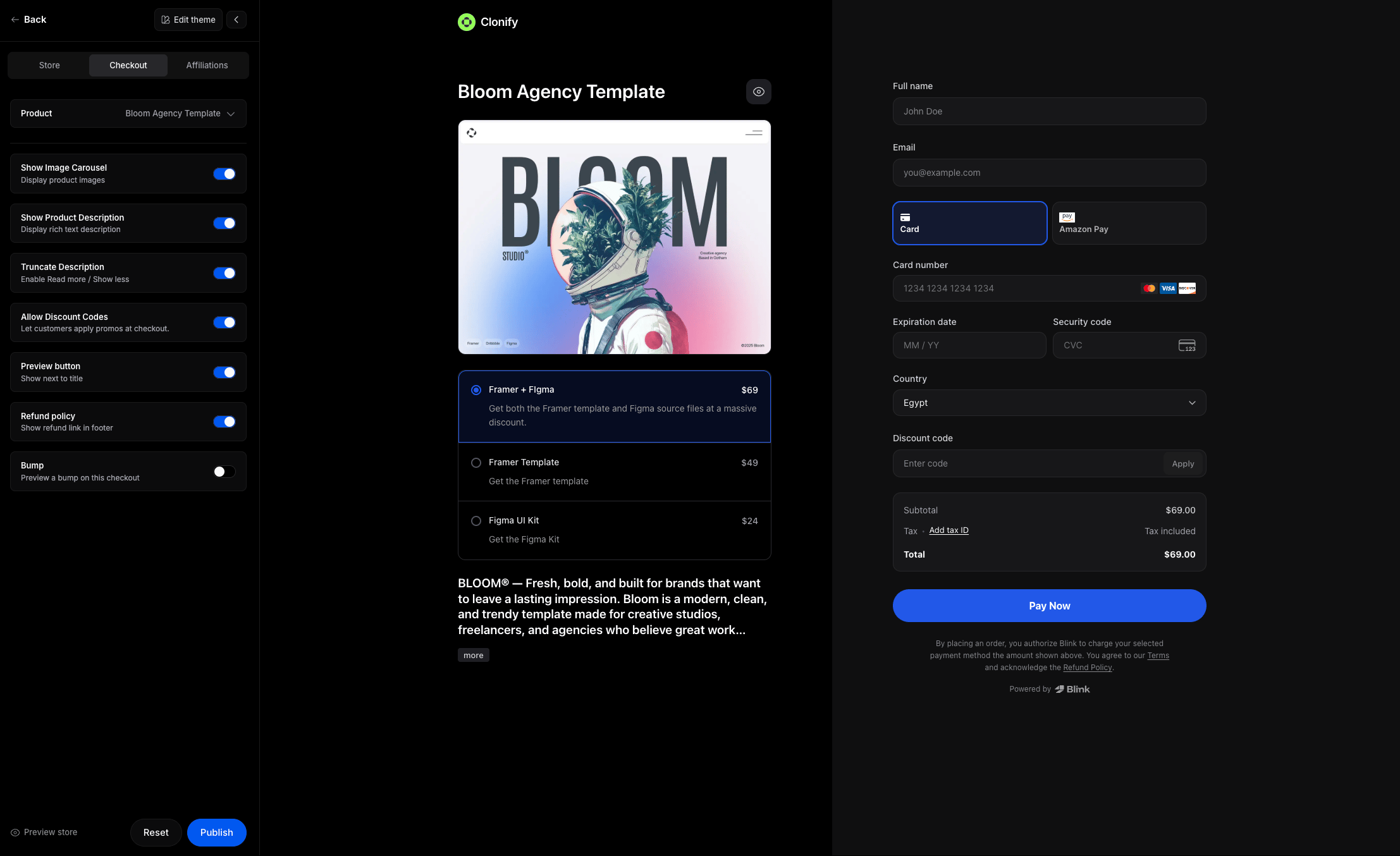 1. Head to your **Design** tab in the sidebar click the **Checkout** tab at the top of the left sidebar.
2. Select a specific product from the **Product** dropdown to preview how its checkout looks in real-time.
3. Use the toggle switches to customize the experience. You can choose to show or hide the image carousel, toggle the rich text description (and set it to truncate with a "Read more" button), enable discount codes, display a live preview button, and more!
4. Click **Publish** to instantly push your checkout changes live.
***
1. Head to your **Design** tab in the sidebar click the **Checkout** tab at the top of the left sidebar.
2. Select a specific product from the **Product** dropdown to preview how its checkout looks in real-time.
3. Use the toggle switches to customize the experience. You can choose to show or hide the image carousel, toggle the rich text description (and set it to truncate with a "Read more" button), enable discount codes, display a live preview button, and more!
4. Click **Publish** to instantly push your checkout changes live.
***