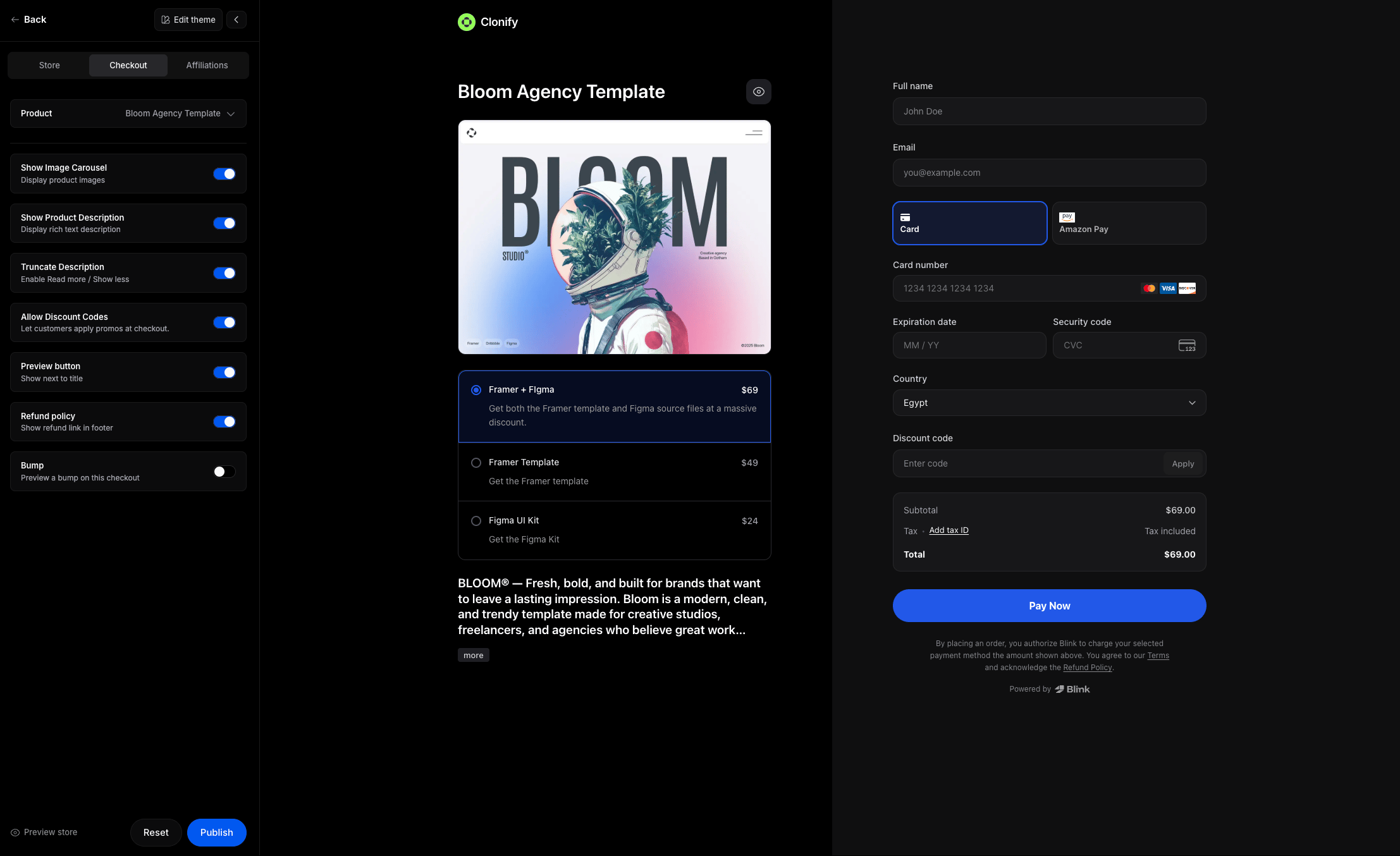
Customize how your store checkout looks and behaves.
Create unlimited custom checkouts with their own styles, and share any product using a checkout that’s different from your store’s default.

Select Product

Choose a product as a preview for your checkout.

Display Options

Control what appears on the checkout page. Preview button
Adds a preview button next to the product title.
Useful if your product has a live demo or showcase.
Discount code
Shows a discount input field at checkout.
Keep this on if you plan to offer coupons or promotions.
Refund policy
Displays a refund policy link in the checkout footer.
Helps set expectations and builds trust before purchase.

Override Theme

By default, your checkout uses your store’s main theme.
Turn on Override Theme if you want the store checkout to have its own unique style.

Colors

Customize the look and feel of your checkout. Button
Primary button color (e.g. “Pay now”).
Button hover
Button color when hovered.
Button text
Text color inside buttons.
Button text hover
Text color when hovering over buttons.
Link
Color for clickable links.
Checkbox
Color of variants checkbox.
Selection border
Border color for selected variant or quick payment method.
Selection background
Background color for selected states.